

SSF Streams
Device Trust (Kolide) supports the Shared Signals Framework (SSF) for delivering device compliance events to external security systems, so you can orchestrate unified security policies across your entire stack. You can access SSF support with the Kolide Admin Console and the Kolide API.
SSF streams allow you to:
- Configure receivers for Kolide compliance and device posture events
- Deliver real-time device trust and risk signals to external security platforms
- Control event delivery using push or poll
- Test and validate event delivery
- Retrieve and acknowledge delivered events
Requirements
To use SSF with Kolide, you need:
- An API key with the special write permission to Manage Shared Signals Framework Streams. Follow the steps to create an API key in Kolide.
- 1Password Device Trust Connect or Unified Access Pro. Contact Kolide support to upgrade.
Manage SSF Streams in the Kolide Admin Console
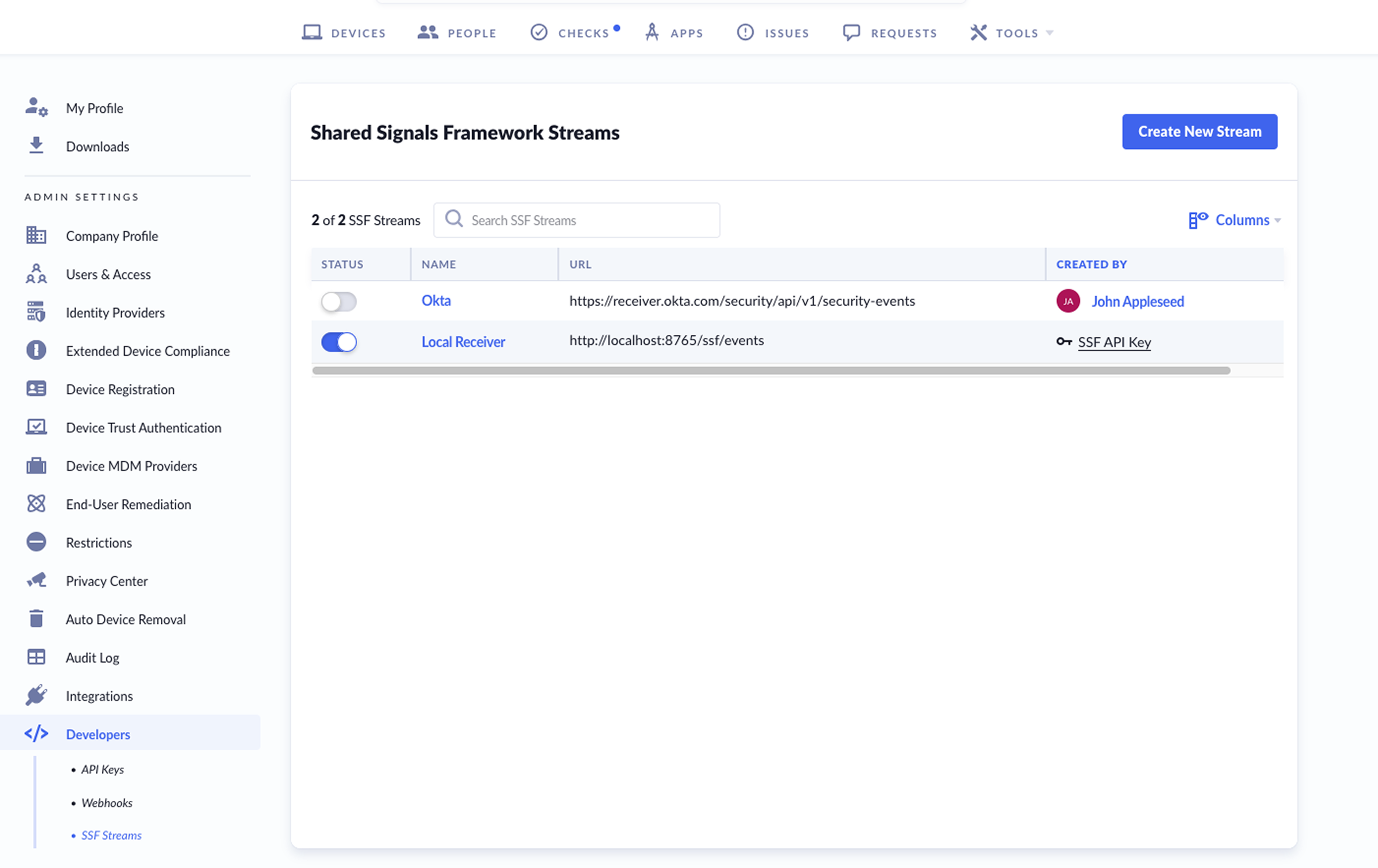
To manage SSF streams:
- Select your profile in the top-right corner and choose Settings.
- Choose Developers > SSF Streams in the sidebar.
From here, you can add, view, edit, enable/disable, or delete streams.
Add a Stream
- Select Create New Stream.
- Enter a name for the stream.
- (Optional) Enter a URL:
- A URL is required if you select Push.
- A URL is optional if you select Poll.
- Set Delivery Type as Push or Poll.
- Set the Spec Version. Choose v1.0 for the standard format (
sub_idat the top level). Only choose the draft version if you need compatibility with older receivers. - Check the
device_trust.status_changedbox. - Select Save.
View Stream Events
- In the SSF streams table, select the stream you want to view.
- Under “Events” you can view the events for that stream.
Edit a Stream
- In the SSF streams table, select the stream you want to edit.
- In the top-right corner, select the Actions dropdown.
- You can change the name, URL, delivery type (push or poll), and event type.
- Select Save.
Turn a Stream On or Off
In the SSF streams table, find the stream in the table and toggle the Status on or off.
Delete a Stream
- In the SSF streams table, select the stream you want to delete.
- In the top-right corner, select the Actions dropdown > Delete.
Manage SSF Streams with the API
All SSF requests must include:
- A valid API token passed in the
Authorizationheader. - A valid
X-Kolide-Api-Versionheader. The current API version is2026-04-07.
Create an SSF Stream
Create a new SSF stream to configure an event receiver.
-
delivery_typemust be either push or poll. -
event_subscriptionscurrently only supports the device compliance change event.
curl --location 'https://api.kolide.com/ssf_streams' \
--header 'X-Kolide-Api-Version: <version>' \
--header 'Content-Type: application/json' \
--header 'Authorization: Bearer <token>' \
--data '{
    "ssf_stream": {
      "name": "Example Receiver",
      "aud": "https://receiver.example.com/web",
      "delivery_type": "push",
      "event_subscriptions": ["https://schemas.openid.net/secevent/caep/event-type/device-compliance-change"]
    }
}'
Example JSON response for the new SSF stream
{
"id": "1",
"iss": "https://api.kolide.com",
"stream_id": "xxxxxxxx-xxxx-xxxx-xxxx-xxxxxxxxxxxx",
"name": "Example Receiver",
"aud": "https://receiver.example.com/web",
"delivery_type": "push",
"enabled": true,
"events_supported": [
"https://schemas.openid.net/secevent/caep/event-type/device-compliance-change"
],
"created_at": "2026-01-23T21:45:43.998Z",
"updated_at": "2026-01-23T21:45:43.998Z",
"delivery": {
"method": "urn:ietf:rfc:8935",
"endpoint_url": "https://receiver.example.com/web"
}
}
Get All SSF Streams
Retrieve a list of all SSF streams configured for your organization.
curl --location 'https://api.kolide.com/ssf_streams' \
--header 'X-Kolide-Api-Version: <version>' \
--header 'Authorization: Bearer <token>'
Example response with a list of SSF streams
{
"data": [
{
"id": "1",
"iss": "https://api.kolide.com",
"stream_id": "xxxxxxxx-xxxx-xxxx-xxxx-xxxxxxxxxxxx",
"name": "Example Receiver",
"aud": "https://receiver.example.com/web",
"delivery_type": "push",
"enabled": true,
"events_supported": [
"https://schemas.openid.net/secevent/caep/event-type/device-compliance-change"
],
"created_at": "2026-01-23T21:45:43.998Z",
"updated_at": "2026-01-23T21:45:43.998Z",
"delivery": {
"method": "urn:ietf:rfc:8935",
"endpoint_url": "https://receiver.example.com/web"
}
}
],
"pagination": {
"next": "",
"next_cursor": "",
"current_cursor": "",
"count": 1
}
}
Get a Single SSF Stream
Retrieve details for a specific SSF stream by the stream id or stream_id.
curl --location 'https://api.kolide.com/ssf_streams/1' \
--header 'X-Kolide-Api-Version: <version>' \
--header 'Authorization: Bearer <token>'
Get a single stream example response
{
"id": "1",
"iss": "https://api.kolide.com",
"stream_id": "xxxxxxxx-xxxx-xxxx-xxxx-xxxxxxxxxxxx",
"name": "Example Receiver",
"aud": "https://receiver.example.com/web",
"delivery_type": "push",
"enabled": true,
"events_supported": [
"https://schemas.openid.net/secevent/caep/event-type/device-compliance-change"
],
"created_at": "2026-01-23T21:45:43.998Z",
"updated_at": "2026-01-23T21:45:43.998Z",
"delivery": {
"method": "urn:ietf:rfc:8935",
"endpoint_url": "https://receiver.example.com/web"
}
}
Update an SSF Stream
Update an existing SSF stream to change its name, aud, delivery_type, or event_subscriptions.
curl --location --request PATCH 'https://api.kolide.com/ssf_streams/1' \
--header 'X-Kolide-Api-Version: <version>' \
--header  'Content-Type: application/json' \
--header 'Authorization: Bearer <token>' \
--data '{
    "ssf_stream": {
    "name": "New Name"
    }
}'
Update a stream example response
{
"id": "1",
"iss": "https://api.kolide.com",
"stream_id": "xxxxxxxx-xxxx-xxxx-xxxx-xxxxxxxxxxxx",
"name": "New Name",
"aud": "https://receiver.example.com/web",
"delivery_type": "push",
"enabled": true,
"events_supported": [
"https://schemas.openid.net/secevent/caep/event-type/device-compliance-change"
],
"created_at": "2026-01-23T21:45:43.998Z",
"updated_at": "2026-01-23T21:51:00.031Z",
"delivery": {
"method": "urn:ietf:rfc:8935",
"endpoint_url": "https://receiver.example.com/web"
}
}
Testing an SSF Stream
You can send a test event to verify delivery. Test events require an email address.
curl --location 'https://api.kolide.com/ssf_streams/1/test' \
--header 'X-Kolide-Api-Version: <version>' \
--header  'Content-Type: application/json' \
--header 'Authorization: Bearer <token>' \
--data-raw '{
    "email": "johnappleseed@kolide.co"
}'
Test a stream example response
{
"success": true,
"response_code": "200",
"ssf_stream_event_id": 1
}
Well-Known SSF Configuration
Kolide provides a well-known SSF configuration endpoint for discovery.
curl --location 'https://api.kolide.com/.well-known/ssf-configuration'
Well-known configuration example response
{
"issuer": "https://api.kolide.com",
"jwks_uri": "https://api.kolide.com/ssf/jwks.json",
"delivery_methods_supported": [
"urn:ietf:rfc:8935",
"urn:ietf:rfc:8936"
],
"events_supported": [
"https://schemas.openid.net/secevent/caep/event-type/device-compliance-change"
]
}
Poll for SSF Events
Use polling to retrieve SSF events for a stream.
curl -X GET "https://api.kolide.com/ssf_streams/<stream_id>/events" \
--header 'Authorization: Bearer <token>' \
--header 'X-Kolide-Api-Version: <version>'
Polling for SSF events example response
{
"sets": {
"abc123-uuid": "eyJhbGciOiJSUzI1NiIsInR5cCI6InNlY2V2ZW50K2p3dCJ9..."
}
}
Acknowledge the Polled SSF Events
For polled SSF events, you need to acknowledge receipt of the events so they’re not returned in future poll requests.
The stream_id is returned when the stream is created.
The JTI is the event identifier returned in the polling response.
curl -X POST "https://api.kolide.com/ssf_streams/<stream_id>/events" \
--header 'X-Kolide-Api-Version: <version>' \
--header  'Content-Type: application/json' \
--header 'Authorization: Bearer <token>' \
 -d "{
    \"ack\": [\"${JTI}\"]
  }"